Email address at my own domain
Enabled my own email address @gnailuy.com using Cloudflare and Gmail for free.
Here is a brief note.
Step 1
My domain name is hosted in Cloudflare and they support Email routing. I need only one email address so I just added a custom address and setup a custom routing to forward all emails sent to here to my Gmail inbox.
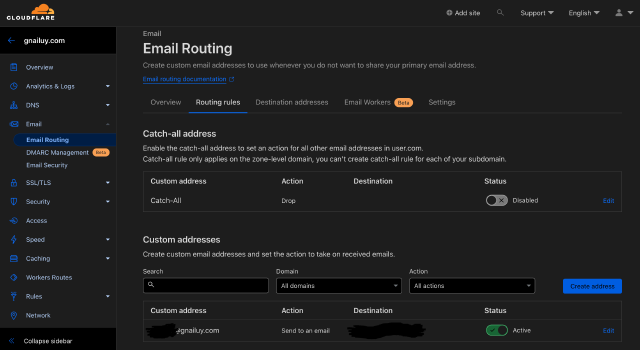
To this point, I can receive emails with my address but cannot send email from it. I need an SMTP server to do this and thanks to Gmail they offer free SMTP.
Step 2
To send or reply mail from my address, I can add my new email address as an alias in Gmail. Follow the below steps to use Gmail’s SMTP.
- Make sure my 2FA is enabled on my Google account.
- Go to my Google Account to create an App Password for later use.
- Open Gmail settings and find:
Settings->Accounts and Import->Send mail as. - Add my new email address and check the
Treat as an aliasoption. - In the next step, use the below information:
| Key | Value |
|---|---|
| SMTP Server | smtp.gmail.com:587 |
| Username | My Gmail address |
| Password | The new App Password I just created |
Keep the default TLS option checked.